
Little Panda's Cake Shop
BabyBusEducational
4.1352.00 Reviews
- Version
- 8.75.00.02
- Installs
- 50.00M
- Age Rating
- Everyone
Screenshots
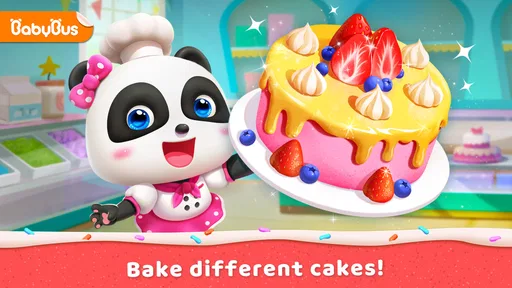




Our Review of Little Panda's Cake Shop
 Analysis by Appyee
Little Panda's Cake Shop is the kind of educational game I would hand to a young child who enjoys bright colors, pretend cooking, and making choices without facing complicated controls. I spent time looking at it as more than a simple bakery title, because the real question for parents is whether it remains pleasant once the first novelty wears off. My impression is positive, but with an important qualification: it works best as a short, supervised activity rather than as a complete replacement for a deeper cooking game or a structured learning app.
Created by BabyBus, the game places the child in a playful cake-shop setting where baking and decorating are the central ideas. The appeal is immediate. A child can experiment with sweet designs, follow a visible sequence of actions, and see a finished result without needing to read long instructions. That makes it approachable for early players, especially those still becoming comfortable with touchscreens.
The game is free to start and is rated Everyone, although optional in-app purchases range from $0.99 to $3.99 per item. I would mention that purchasing detail before giving a device to a child, because a free download can still present paid choices. The title has been available since Jun 8, 2017, and its current version is 8.75.00.02, requiring Android 6.0 or later. Its broad reach—over 50 million installs and a 4.1 average from around 68 thousand ratings—suggests that it has found a substantial audience, but popularity alone does not tell you whether its pace suits your child.
Where children and parents are most likely to get stuck
The first point of friction is not usually the baking itself. It is understanding what the game expects after a child has tapped through the opening moments. Young players often press every visible object, then become unsure whether they have completed a task or merely opened another decoration option. I found that a calm explanation such as “look for the next action that changes the cake” works better than taking over the device.
That matters because the game’s strength is its direct, visual interaction. A child can learn by trying, but an adult who repeatedly completes each step removes the small decision-making challenge. I recommend letting the child make the first attempt, even when the result is messy. The point is not to produce a perfect cake; it is to connect an action with a visible consequence.
Another common stumbling block is the difference between tapping and dragging. Touch games for young children often mix both gestures, and a child may keep tapping an item that needs to be moved. If nothing happens, I would try one slow drag rather than rapid tapping. Demonstrating the gesture once is usually enough, and it avoids turning a harmless control problem into frustration.
Decorating can also create a subtle choice overload. A child may want to use every available visual element at once, then lose track of the cake underneath. I get better results by suggesting a small theme—one color family, a birthday idea, or a “simple cake”—before starting. This turns free-form play into a manageable creative task without making it feel like homework.
What to check before handing over the device
Before the first session, I would check that the device meets the Android requirement and that the game has finished installing completely. If the app opens slowly or shows incomplete content, closing other demanding apps and restarting the device is a sensible first step. I would not immediately assume the game is broken, particularly on an older phone with limited free storage or many background tasks.
A stable connection during installation and updates is also worth checking. Even when a game is intended for simple play, an interrupted download can leave a child staring at a loading screen. If that happens, I would stop the app, confirm the connection, and try again later rather than repeatedly tapping the same button.
Sound is another setup detail that can be mistaken for a gameplay failure. If the child says the game is silent, I would check the device’s media volume rather than only the ringtone setting, then look for any in-game sound control. Some children also find sudden music distracting, so a quieter first session may help them concentrate on the visual sequence.
Because the game is aimed at Everyone, it is easy to think no supervision is needed. I disagree with that assumption when purchases are available. I would configure the device’s purchase protections before play and explain that any shopping-looking option is for an adult. This is not a criticism of the cake activities; it is simply good preparation whenever a child uses a free game with optional paid items.
The current Android requirement is 6.0, which covers many older devices, but compatibility on paper is not the same as a smooth experience on every phone. A device can meet the minimum and still struggle because of storage pressure, an aging battery, or too many open apps. If the game feels sluggish only on one device, testing it after a restart is more useful than comparing it with a newer tablet.
A calmer first-session workflow
My preferred setup is a short first session with an adult nearby. I would begin by showing the child how to recognize the active task, then let them complete one stage independently. After that, I would ask them to describe what they want the cake to look like before choosing decorations. This small pause helps prevent random tapping and gives the creative part more purpose.
For a realistic everyday use case, imagine a child waiting while dinner is prepared. Ten or fifteen quiet minutes with the game can provide a focused activity, particularly if the child enjoys pretend cooking. I would keep the device within sight, set expectations about when play ends, and avoid presenting it as a reward that must be earned through perfect behavior. The game is better as a contained creative break than as an unlimited distraction.
There is also a useful parent-and-child activity here. Instead of watching passively, an adult can ask why a decoration was chosen, what might happen if the order of actions changes, or which cake would suit a particular celebration. These questions add language and planning practice without pretending that the game is a formal lesson. In my view, that shared conversation is where much of its educational value comes from.
If a child becomes upset after making an unwanted choice, I would first look for a back or reset control within the current activity. If the game does not offer an obvious way to undo the action, restarting the small activity may be less stressful than trying to repair every detail. The important point is to keep the recovery light: “Let’s try a different cake” works better than treating the mistake as a failure.
Recovering the workflow when something goes wrong
When the game freezes, stops responding, or remains on a loading screen, I would use a simple order of checks. First, wait briefly to see whether the device is processing the next screen. Then close the game and reopen it. If that changes nothing, restart the device and make sure there is enough free storage for normal operation. These steps are basic, but they solve many problems without risking saved progress or changing settings unnecessarily.
If the issue appears after an update, I would check whether the installation completed and whether the device still has a reliable connection. I would avoid repeatedly uninstalling and reinstalling as a first response, because that can remove local progress and does not fix a broader device problem. Reinstallation is better reserved for a persistent installation fault after simpler checks have failed.
Progress can feel especially important to a child, so I would involve them before taking any action that could erase local information. Ask what they remember completing, take a quick note if necessary, and only then consider more disruptive troubleshooting. This is a small practical habit, but it prevents a technical fix from becoming an emotional setback.
Touch problems deserve their own check. A greasy screen, a thick protector, or a child touching with several fingers can make a drag appear unresponsive. Cleaning the screen and trying the same action slowly with one finger can distinguish a control issue from a software issue. If other apps show the same behavior, the device’s touchscreen is the more likely source.
It is also worth noticing whether the problem follows one particular action. If every activity works except a single transition, reopening the game may help. If the whole device is slow, the better solution may be closing background apps or freeing space. I prefer this observation-based approach because it avoids blaming the game for a general performance problem.
When the game is not the real cause
Some apparent failures are actually caused by the device environment. A child may say that a button does nothing when the phone is in a restricted mode, the screen is partially covered by an overlay, or the device is registering touches inaccurately. Checking the same screen without other floating controls visible can clarify what is happening.
Battery-saving behavior can also affect how responsive a game feels, especially on an older phone. If performance improves after charging or restarting, the limitation is probably related to the device rather than the cake activities themselves. I would not promise that changing one setting will solve every case, but comparing the game under normal conditions is a sensible diagnostic step.
Network trouble is another easy misdiagnosis. If the game worked earlier and now struggles only while loading new content, I would test the connection with another app. If several apps are failing, restarting the router or switching networks is more logical than clearing the game immediately. If everything else works, then the game deserves closer attention.
Parents should also separate a technical issue from a design mismatch. A child who loses interest after a few sessions may not be experiencing a fault. The game focuses on a narrow fantasy—running and decorating a cake shop—so children who prefer racing, open exploration, or more demanding puzzles may simply need something different. That is a product fit question, not a troubleshooting problem.
How it compares with common alternatives
Compared with a traditional puzzle game, this title offers more pretend-play context and less emphasis on a single correct answer. The child’s attention is directed toward making a cake and arranging its appearance, which can feel more personal than matching shapes or solving repeated logic boards. On the other hand, a dedicated puzzle app may provide clearer progression and stronger practice in memory, counting, or problem solving.
Compared with a serious cooking simulator, this is much easier to approach. It does not demand recipe knowledge, precise timing, or an understanding of kitchen equipment before the child can enjoy it. That simplicity is a genuine advantage for younger players, but older children may find the interactions too guided once they have explored the main idea.
It also differs from general drawing apps. Here, creativity is framed by a bakery activity, so a child who needs a prompt may find it easier to begin. A drawing app offers broader artistic freedom, though it can be intimidating for a child who does not know what to create. I would choose the cake shop for guided imagination and a drawing tool for unrestricted artwork.
The educational label should be interpreted realistically. I see learning value in sequencing, visual choice, hand control, and talking about designs, but I would not use it as a substitute for a reading, mathematics, or language-learning program. Its lessons are embedded in play rather than presented as a curriculum. That makes it approachable, but also limits how far it can support a specific academic goal.
Who will enjoy it, and who should skip it
I think it suits preschool and early elementary children who like pretend shops, colorful food, and short touch interactions. It is especially useful when a child wants to “make” something but is not ready for a complex game. Parents who want a gentle activity they can discuss with a child will probably get more from it than adults looking for a fully independent educational tool.
I would skip it for a child who becomes highly frustrated by guided steps or wants a large world to explore. It may also be a poor choice for families who want a completely purchase-free environment, since optional items are available. In that situation, a paid-up-front alternative or a carefully selected offline creative app may offer better peace of mind, even if it has fewer bakery-themed activities.
Older children may enjoy the visual design briefly but outgrow the interaction if they expect layered strategy, realistic cooking, or long-term progression. For them, a more advanced cooking game can provide stronger challenge. The right age fit depends less on the Everyone label than on the child’s patience, reading ability, and appetite for repetition.
My practical verdict
After weighing the enjoyable parts against the setup and supervision issues, I see Little Panda's Cake Shop as a friendly, accessible educational game rather than an all-purpose learning solution. Its best quality is the low barrier to creative play: a child can understand the bakery idea quickly, experiment with a cake, and receive an immediate visual result.
The main trade-off is depth. The same simplicity that makes it welcoming can make it feel limited to children who want more challenge. Optional purchases also mean I would prepare the device before play and stay available for the first sessions. Those are manageable concerns, but they should be part of the decision rather than discovered after a child starts tapping.
My strongest recommendation is to use it intentionally. Keep sessions short, let the child control the decorating decisions, and turn occasional play into a conversation about planning and choices. If loading or touch problems appear, follow the basic device checks before assuming the game is responsible. That approach preserves the fun and avoids unnecessary frustration.
For families seeking a simple, supervised creative activity with a bakery theme, this free BabyBus game is worth trying. I would not choose it for advanced learners, unrestricted artistic work, or formal academic practice, but I would happily recommend it to a younger child who enjoys making pretend cakes and needs an approachable first step into interactive educational games.
Verdict
Strengths of Little Panda's Cake Shop
- Bright, child-friendly graphics make the shop appealing to young players.
- Simple touch controls are easy for preschoolers to understand.
- Creative cake decorating encourages imagination and personal expression.
- Short activities suit quick play sessions and limited attention spans.
- Positive feedback helps children feel rewarded for completing tasks.
Limitations of Little Panda's Cake Shop
- Some children may find the gameplay repetitive after several sessions.
- Certain decorations or features may require in-app purchases.
- The game offers limited challenge for older children.
- Frequent prompts or ads may interrupt play on some versions.
- An internet connection may be needed for updates or selected content.
Other Releases by BabyBus
View All
Little Panda Policeman
Educational4.0

Little Panda's Chinese Recipes
Educational4.4

Little Panda's Restaurant
Educational4.4

Little Panda's Ice Cream Games
Educational4.3
Similar Picks in This Category
View AllLittle Panda Policeman
BabyBus4.0

Monster Trucks Game for Kids 2
Raz Games4.1
Little Panda's Chinese Recipes
BabyBus4.4
Little Panda's Restaurant
BabyBus4.4
Little Panda's Ice Cream Games
BabyBus4.3

Baby Panda Care
BabyBus3.8
Frequently Asked Questions
What is Little Panda's Cake Shop about?
Little Panda's Cake Shop is a child-friendly cooking and bakery game where players help a cute panda prepare and decorate different cakes. You can choose ingredients, mix batter, bake desserts, add frosting, and finish each creation with colorful toppings. The game focuses on simple touch controls, creativity, and playful activities rather than difficult challenges or realistic cooking instructions.
Is Little Panda's Cake Shop suitable for children?
The game is generally designed for young children and preschool-age players, with bright visuals, friendly characters, and straightforward interactions. Most activities are easy to understand and do not require advanced reading or gaming skills. Parents should still check the age rating and available content on their child’s device, since suitability can vary depending on the version and region.
Does Little Panda's Cake Shop require an internet connection?
Many of the basic bakery activities may be playable without a continuous internet connection once the game is installed, which is convenient for travel or offline play. However, certain features may depend on connectivity, including advertisements, updates, additional content, or links to other applications. It is best to test the game in offline mode before giving it to a child.
Are there advertisements or in-app purchases in Little Panda's Cake Shop?
Depending on the platform and version, Little Panda's Cake Shop may include advertisements, optional purchases, or links to other games from the same developer. These elements can sometimes appear between activities or provide access to extra content. Parents should review the store listing and configure parental controls or purchase restrictions before allowing children to play independently.
What can children learn while playing Little Panda's Cake Shop?
The game encourages basic creativity, hand-eye coordination, and familiarity with simple sequences such as choosing ingredients, preparing a mixture, baking, and decorating a cake. It can also introduce children to colors, shapes, and decision-making through playful experimentation. Nevertheless, it should be viewed primarily as entertainment, not as a complete educational cooking tool or a substitute for supervised real-world activities.
Play our best games!


